A Facebook product feed is a structured data file that lists every product you want to advertise across Facebook and Instagram, with one row or item per product. Meta reads the feed into a catalog in Commerce Manager, then pulls titles, prices, images and availability into catalog ads and shops automatically. Required fields are id, title, description, availability, condition, price, link, image_link and brand. Accepted formats are CSV, TSV, XLSX, Google Sheets and XML. Feed accuracy decides what shoppers actually see in every catalog ad.
The product feed is the least glamorous file in a Meta ads account, and it quietly decides what every catalog ad shows. Get a price wrong in a spreadsheet and you have not made a data error, you have published a wrong price to everyone who sees that product. If the catalog itself is not built yet, start with the setup walkthrough.
The reference material tends to sit at one of two extremes. Meta's own specification is complete and accurate, and it reads like a database schema, with the warnings that matter buried inside table cells. Most third-party explanations stop at "it's a spreadsheet of your products."
This article is the middle version: what the file is, every required field with the constraint that actually bites, the optional fields that change what you can do, how multiple images and video work on a single product, what formats and size limits Meta accepts, and how the file gets into Commerce Manager.
What Is a Facebook Product Feed?
A Facebook product feed is a structured file where each row (or each XML item) describes one product, and each column is a named field like title or price. It is a specification, not a free-form export: Meta only reads fields it recognises, and several fields only accept specific values.
Three terms get used interchangeably in Facebook product feed documentation and mean different things:
- Catalog: the database-like container that lives in Commerce Manager and holds your product records. Ads and shops read from the catalog.
- Data source: the method by which products get into the catalog. A feed is one data source. Manual entry, a partner platform integration and the Batch API are others.
- Product feed: the file itself, used as one data source for one catalog.
A single catalog can hold products from more than one source, which is why "feed" and "catalog" are not synonyms. You can have three feeds pointing at one catalog, and the catalog is what your campaigns target.
A feed is also not the ad, not the audience and not the pixel. It is inventory data. What Meta does with that data afterwards is a separate set of decisions.
One note on vocabulary, because older material is full of it. What used to be called dynamic ads or dynamic product ads is now Advantage+ catalog ads. The container that used to be called Business Manager is now the business portfolio, although some Meta help pages still carry the old name. In the feed itself, status is the preferred field name over the older visibility, and internal_label replaced what used to be product_tags.
What a Product Feed Actually Powers
Once products land in a catalog, the feed data becomes the raw material for a set of formats:
- Advantage+ catalog ads, which select products per user rather than per ad
- Catalog carousel ads, where the cards are populated from the catalog instead of built by hand
- Collection ads, including the four-product grid under the hero creative
- Product tag ads and eligible organic product tagging
- Collaborative ads, where a merchant shares a catalog segment with a brand partner
- Shops on Facebook and Instagram, where supported
The mechanical point that matters: in these formats you are not uploading creative per product. Meta assembles the ad at delivery time from feed fields. The image is whatever image_link resolves to, the headline is often the title, and the price shown is the price, or the sale_price if one is active.
That is the difference from a manually built ad, where you choose the image and write the copy yourself. It is also what separates a manual carousel from a catalog carousel. In catalog formats, the feed is not a supporting asset. It is the creative source.
Required Fields in a Facebook Product Feed
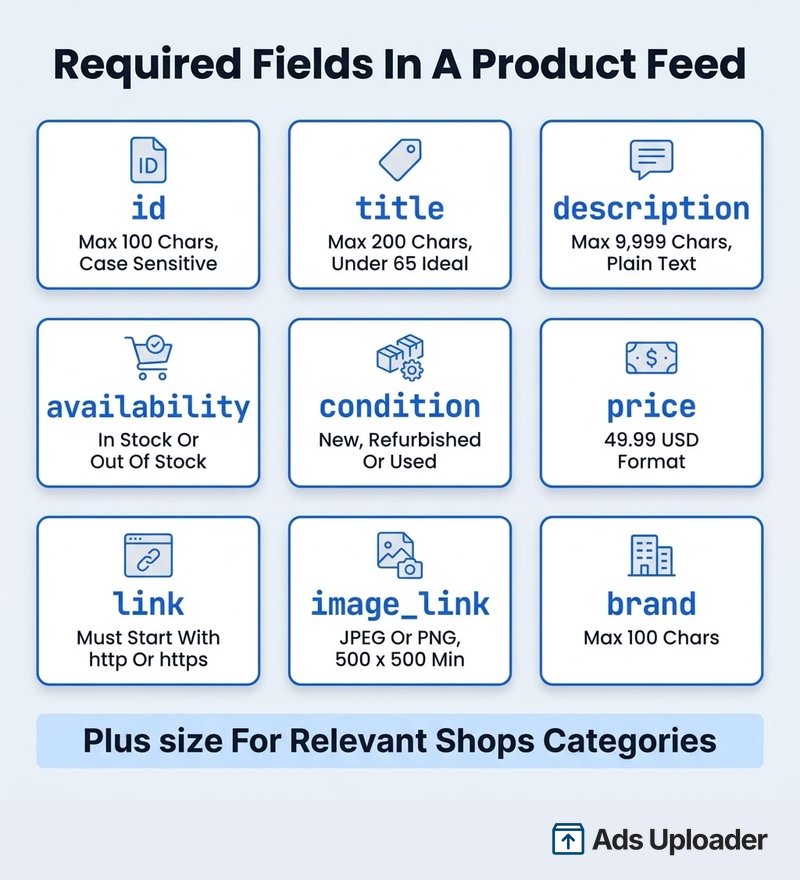
For a standard retail product, nine fields are required, with size conditionally required for some products sold through Shops. Field names must be written in US English, and several fields only accept specific supported values rather than free text.
| Field | What it holds | The constraint that bites |
|---|---|---|
id | Unique product identifier, ideally the SKU | Max 100 characters. Case sensitive, so mug-01 and MUG-01 are two different products. Must not equal any item_group_id. Changing an id creates a new product rather than renaming the old one. |
title | Specific product name | Max 200 characters, with under 65 recommended to avoid truncation. Meta recommends title case. |
description | Detail on features and materials | Max 9,999 characters. Plain text, no links, not all capitals, and it must differ from the title. |
availability | Current stock state | Supported values are in stock and out of stock. Out of stock products do not run in ads, though they can remain visible in a shop as sold out for up to 56 days. |
condition | Product condition | Supported values are new, refurbished and used. |
price | Full price | Number, one space, three-letter ISO 4217 code, for example 49.99 USD. Period as the decimal separator. No currency symbols. One currency per file. |
link | Product page URL | Must begin with http:// or https://. For Shops it has to sit on a domain the business owns. |
image_link | Primary product image URL | JPEG or PNG, at least 500 x 500 pixels, under 8 MB. Meta recommends larger squares where available, including 1,024 x 1,024 for Shops. |
brand | Brand name | Max 100 characters. Marked required in the current specification, even though some older troubleshooting copy still treats brand, GTIN and MPN as interchangeable identifiers. |
size | Size as a word, abbreviation or number | Max 200 characters. Required only for relevant Shops categories such as clothing and footwear, not for every advertised product. |
Two constraints cause more failures than the rest combined.
The first is the price format. $49.99 fails. 49,99 EUR fails. It is a number, a space and the currency code, with a period for decimals, and only one currency in any single data file.
The second is the id, and it is the reason a technically valid feed can still fail to serve. To run Advantage+ catalog ads, the id has to match the identifier your website sends as content_id or content_ids on pixel events, exactly. Not "roughly", not "after you strip the prefix". A case difference or a variant suffix on one side and not the other is enough to break the association between browsing behaviour and the catalog item. Meta's own catalog guidance suggests aiming for a match rate above 75%.
Optional Fields Worth Filling In
The optional list runs long. These are the ones that change what you can actually do, rather than just adding detail.
sale_price and sale_price_effective_date. Same format as price, and it has to be lower than the full price. Set it equal to or above price and Meta simply does not show it, in the ad or in Commerce Manager. The effective date is an interval with both ends specified, like 2026-11-24T09:30-08:00/2026-11-30T23:59-08:00. Without it, a sale price stays live until you remove it.
item_group_id. The variant mechanism, covered in detail in the next section.
google_product_category and fb_product_category. Categories are optional, but they help Meta match your product against similar ones, which matters when the system is choosing what to show a browsing user. Use the most specific category available rather than a top-level bucket.
gtin and mpn. Supply real ones or none. A GTIN goes in without dashes or spaces. An invented identifier is worse than an absent one.
color, gender, age_group, material, pattern. Variant attributes. gender accepts female, male or unisex. age_group accepts adult, all ages, teen, kids, toddler, infant or newborn. The free-text ones cap at 200 characters, except pattern at 100.
shipping. Formatted as Country:Region:Service:Price, for example US:NY:Ground:9.99 USD, with multiple destinations comma separated. This is the field behind the free shipping overlay on catalog ads, and the overlay condition is a zero price applied at country level. A zero price scoped to one region does not qualify.
status. Values are active and archived, defaulting to active. Archived products stay in the catalog but stop appearing in ads and shops, which is a cleaner move than deletion when something goes temporarily off sale.
internal_label versus custom_label_0 to custom_label_4. Both can drive product set filtering. Meta's current documentation recommends internal labels for that job, and gives a specific operational reason: "Unlike custom labels, you can add or update internal labels without sending products through policy review each time, which can impact ad delivery." Internal labels allow up to 5,000 per product at 110 characters each, and Meta normalises them to lowercase. Custom labels are five separate fields at 100 characters each.
rich_text_description. Formatted description for shop pages, with description still required as the plain-text fallback. It is not supported in ads, so it changes nothing about your catalog ad copy.
Facebook Product Feed Multiple Images and Video
This is where most feeds get built wrong, because three different mechanisms all look like "more pictures" and they are not interchangeable.
Launch More. Click Less.
Upload hundreds of creatives at once, auto-match thumbnails to videos, and publish straight to your ad accounts through Meta's API.
Try Ads Uploader FreeNo credit card required • 7-day free trial
Additional Images on a Single Product
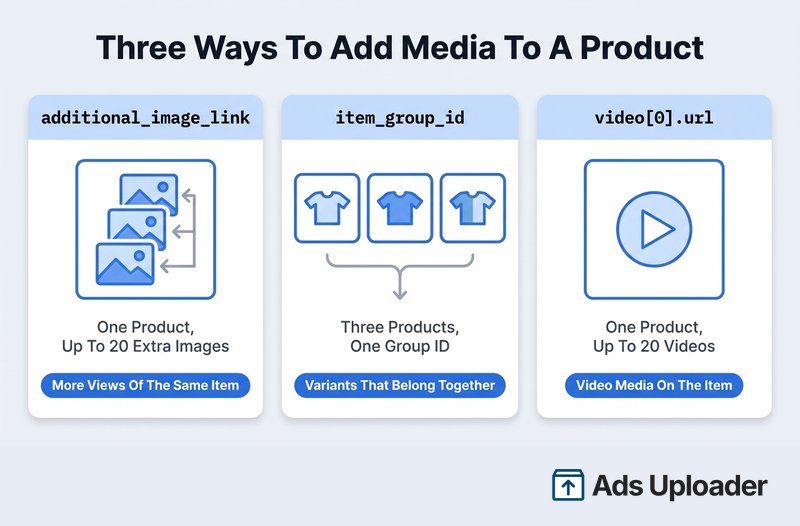
additional_image_link holds up to 20 additional image URLs on one product entry. Counting the primary image_link, that is up to 21 images associated with a single product.
The URLs can be separated by a comma, semicolon, space or vertical bar. Each image follows the same rules as the primary: JPEG or PNG, at least 500 x 500 pixels, under 8 MB. In a CSV, quote the whole field properly if your separator also appears inside the data.
Use this for more views of the same sellable item. A ceramic mug photographed from the front, from above and in use on a desk is one product with three images, not three products.
Where do those extra images show up? Meta's image specifications recommend multiple images for shops and for carousel ads using the slideshow option, suggesting four or more good images for those uses. On the ads side, catalog ad templates expose show_multiple_images, which displays several images for a single product in a carousel, and carousel_slideshows, which builds a slideshow inside a card where the product has multiple images. What Meta does not say is that every catalog ad automatically rotates through all your additional images. Whether they get used depends on the format, the template and the creative automation in play. Populating the field is what makes those options available, not a guarantee they fire.
Variants Versus Extra Images
item_group_id does something else entirely. It links separate product rows that are variants of one another.
Each variant is its own record: its own unique id, its own price, its own availability, its own link and its own primary image_link. What they share is the group id. A canvas backpack in three colours is three rows sharing one item_group_id, not one row with three images.
Two rules people miss. First, the group id must not collide with any product id in the catalog, and it is case sensitive. Second, a different image on its own does not make a valid variant: Meta expects at least one genuine differentiating attribute, such as color or size. Meta supports up to 800 variants in a group, while warning that groups above 300 get hard to manage and display.
So the split is simple once you say it out loud. additional_image_link means more pictures of one product. item_group_id means several products that belong together. Choosing the wrong one is the usual reason a colour variant shows the wrong photo.
Product Video in the Feed
Video attaches to a product through video[0].url through video[19].url, so up to 20 videos per product.
video[0].url is the default, and Meta recommends 4:5 for it. Additional positions carry other ratios, typically 1:1 and 9:16, so the same product has appropriate media for feed and for vertical placements.
The technical rules:
- The URL must resolve to a downloadable video file. A YouTube link or any other player page will not work, because that URL serves a webpage, not a file.
- Maximum 200 MB per video, with no stated duration limit.
- Supported extensions cover a long list including
.mp4,.mov,.avi,.mkv,.flvand.gif.
The practical test takes five seconds: paste the URL into a browser. If it downloads or plays the raw file, it works. If it renders a page with a player on it, Meta cannot use it.
Worth knowing about delivery: product video automation is on by default where eligible, and Meta may substitute a catalog video for the product image when it predicts video will improve cost per result. Carousel and collection are the recommended formats for it. Inside a collection ad, video can take the hero slot, while the product thumbnails underneath stay images.
Why a Replaced Image Does Not Update
Meta caches product media by URL. The specification is blunt about the consequence: "the new image must have a different URL so that we recognize the change and refresh it in your catalog."
Overwrite the file at the same address and Meta has no signal that anything changed. The old image keeps running.
This is also why placeholder images are a trap. Publish image-coming-soon.jpg at a stable URL, and when the real photograph lands at that same URL later, it never gets fetched. Meta's advice is to wait and add the final image rather than ship a placeholder.
The fix is to version the URL. desk-lamp-01-v2.jpg, or a path that changes when the asset changes. Then put the new URL in the next upload.
Facebook Product Feed Formats and Size Limits
Meta's supported formats are CSV, TSV, Excel XLSX, Google Sheets and XML in RSS or Atom form. ZIP and GZIP are compression wrappers for those, not separate formats.
| Format | How it is structured | When it fits |
|---|---|---|
| CSV | Field names as column headers in row one, one product per row | The default for most exports and scripts |
| TSV | Same as CSV with tabs, so commas inside values need no escaping | Product data full of commas |
| XLSX | Excel workbook, headers in the top row | Feeds maintained by hand |
| Google Sheets | Headers in row one, data in the first tab only | Small catalogs with several editors |
| XML (RSS/Atom) | Tagged items, one field per line, valid xml declaration | Feeds generated by a web server or platform |
One clarification, because it circulates widely: a standalone JSON file is not on Meta's accepted list. JSON does appear in the ecosystem, as an encoded value inside a CSV field (video objects, for instance) and in Marketing API request payloads, but neither of those makes a .json file a valid data feed upload.
The limits:
- 100 MB for a one-time upload, 4 GB for a scheduled feed
- Compress into ZIP or GZIP above 1 GB
- Up to roughly 1 million products per feed, splitting beyond that rather than trimming
- 5,242,880 characters maximum on any individual row or line
Two format-specific notes. Google Sheets feeds must have the data in the first tab, with sharing set so anyone with the link can view. And if you generate CSV in code rather than a spreadsheet app, apply normal CSV quoting: wrap any value containing a comma or meaningful whitespace in double quotes, and escape an internal double quote by doubling it.
Save Hours on Creative Testing
Stop uploading ads one by one. Bulk process unlimited creatives with automatic media matching and direct API publishing.
Try Ads Uploader FreeNo credit card required • 7-day free trial
How the Feed Reaches Commerce Manager
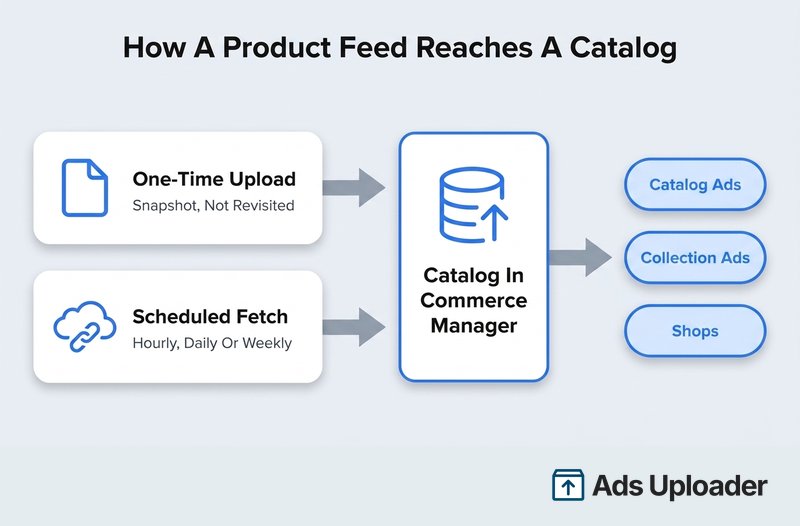
A Facebook product feed reaches Commerce Manager in one of two ways, and the difference matters more than it first appears.
A one-time upload takes a file from your computer, or a URL supplied once. It is a snapshot. Meta will not revisit it.
A scheduled fetch points Meta at a hosted file and lets it collect the file on a cadence. The URL rules are specific: it must start with http://, https://, ftp:// or sftp://, and it must resolve to the file itself rather than a landing page, a login form or a file preview screen. Test it in a browser first. If it opens or downloads the file, Meta can fetch it.
Commerce Manager offers hourly, daily and weekly schedules, and hourly is the ceiling: a scheduled feed cannot be fetched more often than that. The Marketing API additionally exposes monthly. If you set a schedule, time it to land after your own file regenerates. A file that rebuilds at 09:00 pairs with a 09:15 fetch, not an 09:00 one.
There is also a distinction between a replace schedule, which treats the file as the complete picture and can delete products missing from it, and an update schedule, which adds and updates but never deletes. Meta documents running a frequent update schedule alongside a less frequent full replacement, as long as the two are at least ten minutes apart. That pattern suits catalogs where price and stock move fast but the full product list changes slowly.
On the first upload, if your column names do not match Meta's schema, Commerce Manager may offer to map them, for instance matching a column called name to the supported title field. Approve those and Meta saves them as data rules that apply to future uploads of the same feed. Useful, though it is not a reason to keep non-standard headers. Official field names make the file easier to debug outside Commerce Manager.
Each completed upload returns a summary: how many products were added or updated, which errors blocked products or the whole file, and which issues will stop products from appearing. That summary is the first place to look when something is missing.
Primary, Supplementary and Country Feeds
Not every Facebook product feed does the same job.
A primary feed creates and owns product records. It carries the full required field set, and it is what most people mean by "the feed".
A supplementary feed enriches products that a primary feed already created. It matches on exact existing ids, is linked through the primary feed rather than standing alone, and can fill in fields like titles, descriptions, images, categories, brand, variant grouping and video. What it explicitly cannot override is the product id, price, sale_price, availability or quantity_to_sell_on_facebook. That boundary is the important part: a supplementary feed is not a route for price or stock updates. Where a supported field appears in both, the supplementary value wins in the catalog without touching the primary file. One supplementary feed can serve several primary feeds, but each primary feed links to only one supplementary feed.
Country and language feeds override localised values on products that already exist. A country feed handles market-specific price, sale price, availability, status and destination link. A language feed handles translated text like titles and descriptions. There is a combined mode for both, and where several overrides could match, precedence runs language-and-country first, then language, then country, then the main feed value.
This is also the real answer to multi-currency. A normal primary data file carries one currency. A catalog serves many, through country feeds. For catalogs above 100,000 products, Meta recommends one feed per country or language rather than one large override file.
Two more behaviours worth knowing before they surprise you. Deletion on a feed currently defaults to enabled, meaning a full replacement can remove feed-owned products that are missing from the new file, and once deletion has been enabled Meta does not allow it to be turned off for that feed. That is a strong argument for marking things out of stock rather than dropping rows, since the catalog keeps the item and its history. And when a feed outgrows the size or item limits, splitting is supported properly: create the new feed referencing the old feed's id as its origin, upload the subset, and ownership of those items transfers on the first completed session instead of registering as a mass deletion.
Keeping a Facebook Product Feed Accurate
Meta does not prescribe one update frequency, and it should not, because catalogs move at different speeds. The workable rule is to fetch at least as often as the fields that matter actually change.
- Hourly for fast-moving stock, flash sales or volatile pricing
- Daily for ordinary e-commerce inventory
- Weekly only where products, prices and availability genuinely change slowly
Beyond cadence, a short list covers most of what goes wrong:
- Use
out of stockfor temporary unavailability rather than deleting rows. Availability is the field that keeps unavailable products out of ads. - Keep ids stable and identical across the feed, your pixel and server events, and any localised override feeds. An id that changes orphans the product's history.
- Version image URLs whenever the image content changes.
- Write titles that read as product names rather than promotional copy. In a catalog ad the title is often the only text a shopper sees attached to the product.
- Fill in categories even though they are optional, since they help Meta match your products against what a user was already looking at.
- Read the upload summary after every fetch, not just the first one.
- Avoid unnecessary field edits. Substantive changes can send products back through policy review, which is exactly the churn internal labels exist to avoid.
Meta's own guidance on high-quality catalogs makes the same general point: complete and accurate product data helps its systems recommend the right products. It does not publish a number attached to that, and no credible market-wide statistic exists for how much e-commerce spend runs through catalog ads either, so treat any specific percentage you see quoted with suspicion.
The wider context is that Meta's delivery system leans harder on data quality than on manual configuration every year. For catalog formats, feed completeness is that data.
Frequently Asked Questions
What is a Facebook product feed? A structured file, in CSV, TSV, XLSX, Google Sheets or XML form, containing one record per product. Meta ingests it into a catalog in Commerce Manager, and catalog ads and shops read from that catalog. The feed is the input, the catalog is the container, and one catalog can be fed by several sources.
What fields are required in a Facebook product feed?
For a standard retail feed: id, title, description, availability, condition, price, link, image_link and brand. The size field is additionally required for relevant products sold through Shops, particularly clothing and footwear.
Can a Facebook product feed have multiple images per product?
Yes. One primary image_link plus up to 20 URLs in additional_image_link, so up to 21 images per product entry. Separate the URLs with a comma, semicolon, space or vertical bar, and hold every image to the same specs as the primary one.
What is the difference between additional_image_link and item_group_id?
additional_image_link adds more pictures to one product record. item_group_id links several separate product records that are variants of each other, each with its own id, price, availability and primary image, plus at least one attribute that actually differentiates them.
What file formats does Facebook accept for a product feed? CSV, TSV, Excel XLSX, Google Sheets and XML in RSS or Atom form, optionally compressed as ZIP or GZIP. A standalone JSON file is not an accepted feed format.
Why did my product image not update after I replaced it? Meta caches product media by URL, so overwriting the file at the same address gives Meta no signal to re-fetch. Change or version the image URL, then include the new URL in the next upload.
How often should a Facebook product feed be updated? At least as often as price, availability and product data change. Commerce Manager supports hourly, daily and weekly schedules, and hourly is the maximum fetch frequency.
How large can a Facebook product feed be? 100 MB for a one-time upload, 4 GB for a scheduled feed, with compression recommended above 1 GB, roughly one million products per feed, and a 5,242,880 character ceiling on any single row.
What is the difference between a product feed and a catalog? The feed is an input file describing products. The catalog is the persistent container holding them after ingestion, and it is what ads and shops actually read.
Can one product feed carry more than one currency? A normal primary data file should carry one currency. Multiple markets are handled through country feeds, which override price, sale price, availability, status and link per country, so the catalog serves many currencies even though the main file carries one.
Sources and Further Reading
Every specification above comes from Meta's current documentation:
- Product data specifications for catalogs in Commerce Manager, the canonical field reference
- Product image specifications for catalogs, including the image re-fetch rule
- Product feed API reference on Meta for Developers, for feed types, scheduling and deletion behaviour
- Tips for building a high-quality catalog
Conclusion
A Facebook product feed is a file with named fields, and almost everything that goes wrong with catalog ads traces back to one of those fields being wrong, missing or stale.
The parts worth remembering:
- Nine fields carry the load:
id,title,description,availability,condition,price,link,image_linkandbrand, withsizeadded for relevant Shops categories. priceis a number, a space and an ISO 4217 code, with one currency per file. Country feeds handle the rest.idhas to match the content id your pixel sends, exactly, or Advantage+ catalog ads cannot connect browsing behaviour to the product.- Multiple images live in
additional_image_link(up to 20 extra per product). Variants live in separate rows sharing anitem_group_id. Video lives invideo[0].urlthroughvideo[19].url. Three mechanisms, three jobs. - A replaced image needs a new URL, or it never gets re-fetched.
- Accepted formats are CSV, TSV, XLSX, Google Sheets and XML, at 100 MB for a one-time upload and 4 GB scheduled.
The useful next step is opening your own file next to the required fields table above and checking it field by field. Most feeds that underperform are not broken in an interesting way. They are missing categories, carrying an unversioned image URL, or holding an id that stopped matching the site six months ago.
