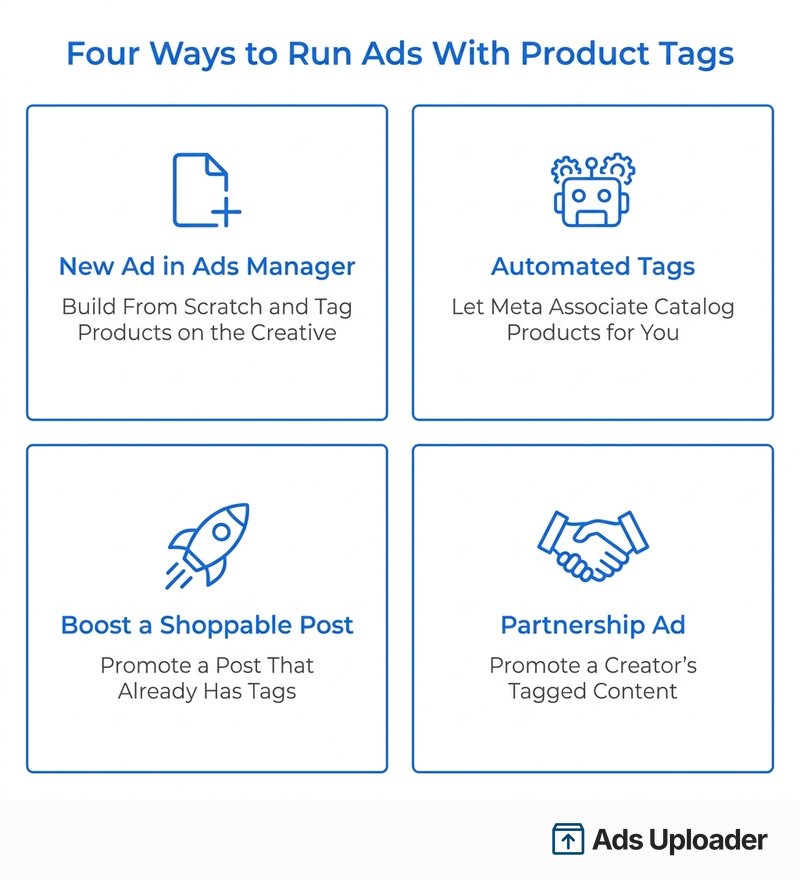
Product tags on Facebook and Instagram ads are clickable markers that connect items in your ad creative to specific products in a Meta catalog. When a shopper taps a tag on a supported mobile placement, a product detail view opens with the name, image, and price, then sends them to the merchant's site or an eligible in-app checkout. Advertisers add tags in Meta Ads Manager four ways: a new ad, automated tags, a boosted shoppable post, or a partnership ad. Every route requires a catalog in Commerce Manager.
Search "product tags on Facebook" and you get a stack of guides about tagging organic posts: create a post, drop a tag, hope for reach. Useful if you run a Page. Close to useless if you run ads.
Advertisers want something different. You want the product tagged inside the paid creative, so the person who sees your ad can tap the item, see the price, and start buying. That is a distinct feature with its own setup, its own eligibility, and its own recent changes that most of the ranking guides never mention.
This guide covers the advertiser version only. What product tags do inside ad creative, the four ways Meta lets you run them, how automated tagging actually works (and what gets overstated about it), what changed with Facebook web shopping, and how to set the whole thing up without tripping over catalog requirements.
What Are Product Tags on Facebook Ads?
A product tag in an ad is an interactive reference from your creative to one specific item in a Meta catalog. It is not a hard-coded link you type in. Under the hood, the tag resolves to a catalog product ID, which is why the tag can pull live details like the product name, image, and price straight from your catalog.
That catalog dependency is the whole point. The tag is not decoration. It is a shoppable hook wired to inventory, so a single ad can carry the creative and the storefront moment in the same unit.
How a Tapped Tag Behaves in 2026
Here is where a lot of older advice is wrong. For years, the promise was that a product tag sent people to an in-app Shop where they checked out without ever leaving Facebook or Instagram.
That is no longer the universal path. Meta retired its former onsite checkout across 2025, and most shoppers now continue to the merchant's website after they tap. The typical flow today looks like this:
- The shopper taps the tag, sticker, or product card.
- A product sheet opens using your catalog data (name, image, price).
- The shopper continues to your website, or, if you are on a currently supported direct-checkout integration, completes an eligible purchase on the Meta surface.
A limited-release, Shopify-powered direct checkout can still keep some transactions on Meta in 2026, but it is not the default for everyone. So when you plan creative and destinations, assume most taps end on your own site, and make sure that landing experience matches the product the shopper tapped.
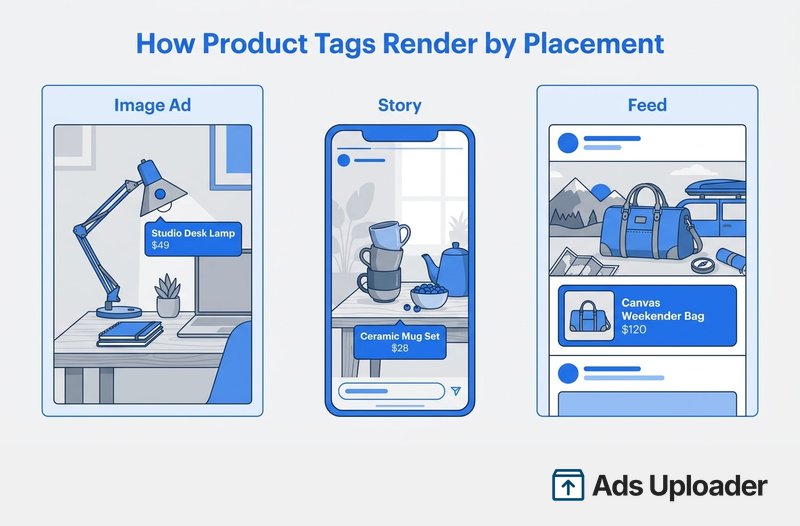
How Tags Render by Placement
Meta does not publish a fixed, placement-by-placement visual contract, and the treatment can change. The render patterns advertisers see in practice are:
- Image creative: a tap target or tooltip sitting over the product in the frame.
- Instagram Stories: a product sticker.
- Feed and automated presentations: a small product card or thumbnail beneath the main creative, often with the name or price.
Treat those as observed behavior, not a guarantee. The practical takeaway: preview every placement before you publish, because the same ad can deliver on a placement without showing the interactive tag the way you pictured it.
Product Tags in Ads vs. Organic Product Tags
The reason the search results are confusing is that two different features share one name.
Organic product tags live on unpaid content: a Page photo, an Instagram feed post, a Story, or eligible creator content. They depend on organic shopping permissions and give you reach without spend.
Product tags in ads live on paid creative. You add them in Ads Manager, let Meta add them as an ad enhancement, or keep them when you promote an existing shoppable post. On top of the tag, you get everything paid media brings: targeting, optimization, budget control, and campaign reporting.
Both require a catalog. The difference is control and scale. An organic tag hopes the right people scroll past. A tagged ad puts that same shoppable moment in front of an audience you chose, at a volume you set. If you are spending money to be seen, the ad version is the one you actually want.
What Changed: Facebook Web Shopping Went Away
If you read that product tags "no longer work on Facebook," that is half right and often mangled with the wrong date.
Meta deprecated Facebook Shops on desktop and mobile web. The effective change was reported for late December 2023 and rolled out visibly through February 2024. It is still in force in 2026, but it is not a new 2026 event. What went away on the web:
- The View Shop button and Shops tab on Facebook Pages.
- Storefronts, product detail pages, collections, search, and wishlists.
- Facebook web product tags leading to a product detail page.
- The Facebook Cart, which is hidden or intentionally emptied.
Here is the part the scare-headlines miss: product tags in ads are not Instagram-only. Meta brought shoppable product-tag ads to the Facebook Feed in March 2024 and expanded them globally in April 2024, including for businesses that do not have a Shop at all, as Search Engine Land reported at the time.
The real distinction is surface, not platform:
- Facebook mobile app: shoppable product-detail experiences can still work where eligible.
- Facebook desktop and mobile web: the native Shop, product page, and cart journey does not.
- Your ad's CTA or link: can still send a browser user straight to your website, whatever their device.
So the correct planning assumption is not "abandon Facebook." It is "the in-app experience carries the shoppable moment, and your website carries the checkout."
Launch More. Click Less.
Upload hundreds of creatives at once, auto-match thumbnails to videos, and export directly to Meta Ads Manager.
Try Ads Uploader FreeNo credit card required • 7-day free trial
The Four Ways to Run Ads With Product Tags
Meta keeps dedicated help pages for running ads with product tags, including its About ads with product tags overview. In practice, there are four routes, and each fits a different starting point.
Create a New Ad With Product Tags in Ads Manager
This is the manual route, and it gives you the most control. The working sequence:
- In Ads Manager, select Create and choose an eligible objective. Sales is the most natural fit for purchases, though Traffic also works for sending people to product pages.
- Set your destination, optimization, audience, budget, and placements.
- At the ad level, upload the image, video, or carousel.
- Open the creative tools and select Product tags.
- Choose the catalog, find each item, and place a tag over the correct product in the frame.
- For a carousel, add a tag to each card you want to stay shoppable.
- Preview every selected placement, then publish.
Use this when the creative is the strategy: a launch shot, a styled flat lay, a demo video where you want to point at exactly the right SKU.
Let Meta Add Product Tags Automatically
Ads Manager can also add tags for you, usually under Add product tags in the creative enhancements, or inside the Advantage+ creative enhancements panel. You can switch it off and republish if it gets in the way.
Two cautions, because this feature gets oversold online.
First, the popular claim that Meta announced "automated product tags" in June 2024 is wrong. The canonical Marketing API announcement was published in October 2023, and it covered creating and promoting posts with product tags through the API, not automatic visual matching. You can read Meta's developer post for the actual scope.
Second, you will see confident explanations that automated tags work by matching your creative to catalog images or by matching your ad's destination URL to catalog items, and that the feature is switched on automatically for every Traffic or Sales advertiser. Those descriptions come from third-party operators, not a current Meta primary source, and the blanket auto-activation claim could not be confirmed. The safe move: do not assume it is on. Check the ad-level enhancement yourself, confirm which catalog and items Meta associated, and look at each placement preview before you trust it.
Boost an Existing Shoppable Post
If you already have an organic post with approved product tags that is performing, you can promote it and keep the tags and the social proof.
In Ads Manager, build the campaign, then at the ad level choose Use existing post and select the tagged post. An eligible Instagram professional account can also open the post and use Promote directly. Either way, preview and publish.
The catch: the ad inherits the post's problems too. A rejected item, a deleted catalog ID, or an ineligible tag can make the post unboostable, so confirm the tags are clean before you put budget behind it.
Run a Partnership Ad From Creator Content
What used to be called branded content ads are now partnership ads. If a creator has posted content that tags your catalog product, you can promote it as your own ad, with the creator's permission.
The creator grants promotion access (through account settings or an ad code), then in Ads Manager you enable the partnership ad setting, select the brand and creator identities, choose Use existing post and Partner content, and pick the tagged post or Reel.
One thing to verify: a paid-partnership label or a brand mention authorizes the identity, but it does not make the content shoppable on its own. The underlying post still needs an eligible product tag from the right catalog.
Save Hours on Creative Testing
Stop uploading ads one by one. Bulk process unlimited creatives with automatic media matching and direct API publishing.
Try Ads Uploader FreeNo credit card required • 7-day free trial
What You Need Before You Can Tag Products in Ads
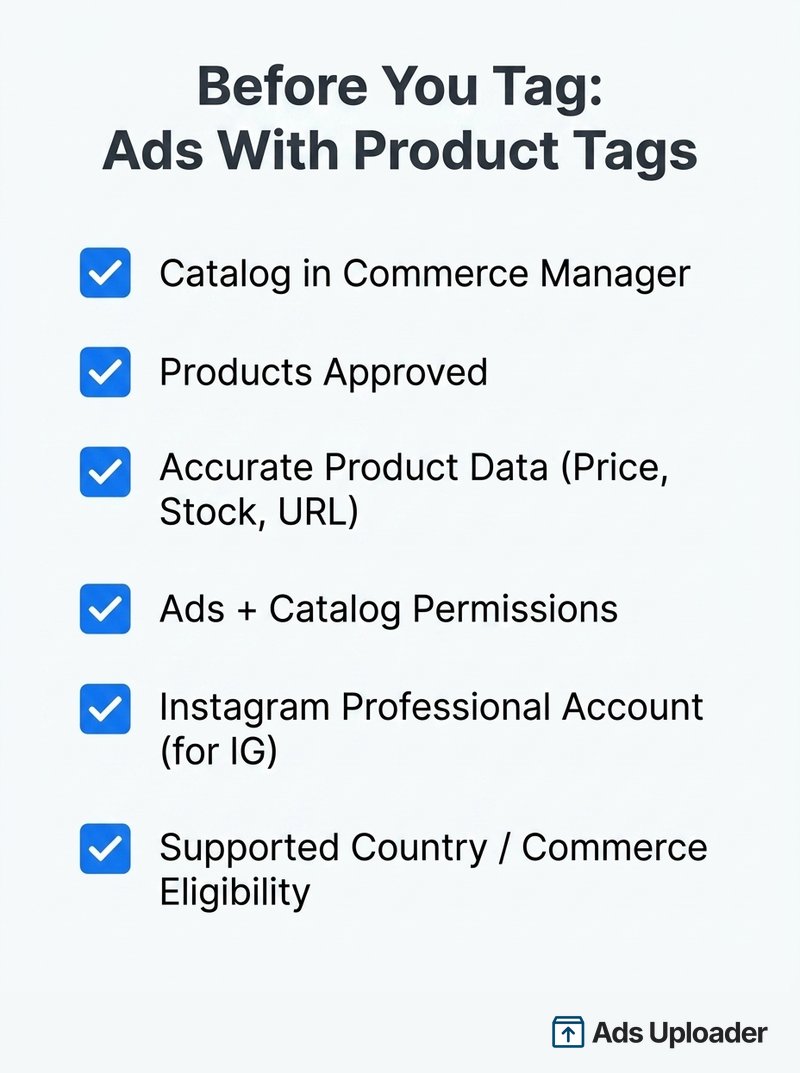
Product tags fail quietly when a prerequisite is missing. Run this checklist first.
- A catalog in Commerce Manager. Every tag resolves to a catalog product ID, so no catalog means no tags. You do not necessarily need a public Shop after the April 2024 rollout, but you always need the catalog.
- Approved products. Items are reviewed under Meta's Commerce Policies, and when advertised they also have to meet Advertising Standards. Rejected items cannot be tagged.
- Clean product data. Stable IDs, working product URLs, real images, titles, current prices, and accurate availability. A tag pointing at an out-of-stock or mispriced item is worse than no tag.
- The right access. "Editor or Admin" is legacy language. Under the current Pages setup, you need Facebook access or task access for Ads, plus catalog permission to build ads from the catalog. Anyone maintaining the feed needs broader catalog management access.
- A connected Instagram professional account if you plan to run Instagram placements.
- Supported country and commerce eligibility. Availability of Shops, Shops ads, and product tagging varies by market and changes without a public change log, so confirm the live eligibility page right before launch.
If you use a platform like a hosted store or a feed tool, it can automate the price, stock, and image updates for you, which is the main reason to connect one. It is not strictly required: products can also be supplied manually, by data feed, or through the API.
Product Tags vs. Advantage+ Catalog Ads
These get confused constantly, but they solve different jobs.
With manual product tags, you pick the creative, you pick the products, and you place the tags. You decide exactly what the shopper sees. With Advantage+ catalog ads (Meta's successor to dynamic product ads), Meta selects and personalizes products from your catalog for each viewer, and assembles the creative from catalog data and the assets you supply. Our guide to Meta catalog ads covers that side of the system end to end.
| Dimension | Manual Product Tags | Advantage+ Catalog Ads |
|---|---|---|
| Product selection | You choose the exact items | Meta selects and ranks from the catalog |
| Creative control | You control the hero shot and tag positions | Creative is assembled dynamically |
| Personalization | Same products for the audience | Products vary by viewer |
| Best for | Launches, lifestyle, UGC, bundles | Large inventory, prospecting, retargeting |
| Catalog required | Yes | Yes |
They also overlap. An Advantage+ catalog ad can use automatic product tagging, and formats like carousels and collections show multiple catalog items either way.
The line is blurring on purpose. Meta announced in mid-2026 that product data would flow into all Sales campaigns over the summer, letting its AI match products, people, and formats when you supply both product data and creative. Expect the boundary between "a tagged ad" and "a catalog ad" to keep softening.
Do Product Tags Actually Lift Performance?
Honest answer: the clean evidence is thin and old.
The strongest tag-on versus tag-off comparisons Meta has published are from 2021. In one Instagram split test, a fashion retailer's tagged carousel ads reported 30% lower cost per purchase, 1.4 times higher return on ad spend, and 20% more link clicks than the untagged version. A separate 2021 case study on video ads with product tags reported roughly three times more purchases per website visit.
Those are real, but they are individual tests, several years old, and they ran on an in-app Shop path that has since changed. There is no strong 2024 to 2026 cross-advertiser benchmark that isolates the effect of product tags on CTR, conversion rate, or ROAS.
So the defensible position is simple. Product tags can shorten the trip from a scroll-stopping image to product details, and they have helped in specific Meta tests. But you should prove it on your own account with a controlled test rather than treating the 2021 numbers as a promise.
Best Practices for Shoppable Ads With Product Tags
- Keep the catalog accurate and current. Sync price and availability, suppress out-of-stock items, keep IDs stable across feed refreshes, and confirm every URL resolves to the exact product or variant you tagged. Update volatile inventory at least daily.
- Use contextual, in-use creative. Lifestyle, demo, and creator imagery explain why someone wants the item, then the tag names exactly which one it is. That combination is the real advantage of manual tags over a plain catalog tile. Place each tag near its product, and never cover faces, key details, or placement safe zones.
- Tag fewer products, not more. Plan around a maximum of five per image, and usually use one to three. The higher tag counts you see quoted online tend to be organic Instagram or creator limits, and they do not automatically apply to ads.
- Align tag, CTA, and landing page. If a tag points at one SKU, the call to action and the destination should lead to that SKU, not a generic category page. Match price, promotion, and variant across the tag, the catalog, and the site.
- Measure with the right signals. Since most taps now end on your website, your Meta Conversions API setup matters for catching those conversions and feeding optimization. Watch outbound CTR, product page views, add-to-cart rate, cost per purchase, and ROAS, and check whether tag taps add qualified exploration or just cannibalize the main CTA.
- Preview every placement, and drop stale ones. Do not reuse old setup instructions that recommend Instagram Explore, which Meta removed as a paid placement in July 2026.
Frequently Asked Questions
What are product tags on Facebook ads? They are interactive references from your ad creative to specific items in a Meta catalog. On supported Facebook or Instagram mobile placements, a shopper can tap the tag to see catalog details like name, image, and price, then continue to your website or an eligible in-app checkout. Each tag is tied to a catalog product ID, not a plain hyperlink.
What is the difference between product tags in ads and organic product tags? Organic tags sit on unpaid posts, Stories, or creator content and rely on organic shopping permissions. Ad product tags sit on paid creative you build or promote in Ads Manager, and they add targeting, budget, optimization, and reporting. Both require a catalog, but only the ad version gives you paid distribution and campaign controls.
Do product tags still work on Facebook web in 2026? Not as a native Shop or product-page experience. Facebook deprecated desktop and mobile web Shops starting in late 2023, so web product tags no longer open Facebook product detail pages and the cart is hidden. Mobile-app shopping still works where eligible, and your ad's link can still send web users to your own site.
What are automated product tags, and who gets them automatically? They are an Ads Manager enhancement that associates catalog products with your creative and shows shoppable details. It is available for eligible campaigns, often within Advantage+ creative. The common claim that every Traffic or Sales advertiser is automatically opted in is not confirmed by current Meta documentation, so check the ad-level enhancement and placement previews yourself.
Do I need a catalog to run ads with product tags? Yes. The tag has to resolve to a catalog product ID, so a catalog in Commerce Manager is required. You do not necessarily need a public Facebook or Instagram Shop for a newly created paid product-tag ad, since Meta expanded these ads in April 2024 to businesses without a Shop, but boosting an organic shoppable post can still require organic shopping eligibility.
How many products can I tag in one ad? Plan around a maximum of five per image or creative in the manual paid workflow, and use fewer for clarity. Higher numbers you see quoted, such as 20 per carousel or 30 per post, come from organic Instagram or creator features and should not be treated as paid-ad limits. The often-cited "30 product tags per Facebook post" could not be verified and looks like confusion with Instagram's hashtag limit.
Are ads with product tags the same as Advantage+ catalog ads? No. In a manual product-tag ad you choose the creative, products, and tag positions. In an Advantage+ catalog ad, Meta selects and personalizes products and formats for each viewer from your catalog. They can overlap, because an Advantage+ catalog ad may also use automated tagging, but the control model is different.
Bringing It Together
Product tags on Facebook ads turn ordinary creative into a shoppable unit by wiring each tag to a real catalog product. You can run them four ways: build a new tagged ad, let Meta add tags automatically, boost an existing shoppable post, or promote a creator's partnership content. All four need a clean catalog in Commerce Manager and approved products behind them.
Just hold two facts in mind as you plan. The Facebook web storefront is gone, so the shoppable moment lives in the mobile app while checkout usually lands on your own site. And the automated-tagging feature is genuinely useful but widely misdescribed, so verify what Meta actually attached to your ad instead of trusting the setup on faith. Get the catalog right, keep the tags few and relevant, and test tag-on against tag-off before you decide product tags earned their place in the ad.
