User Defaults
Customize Ads Uploader settings to match your team's workflow and naming conventions.
Access your defaults at Account > Defaults.
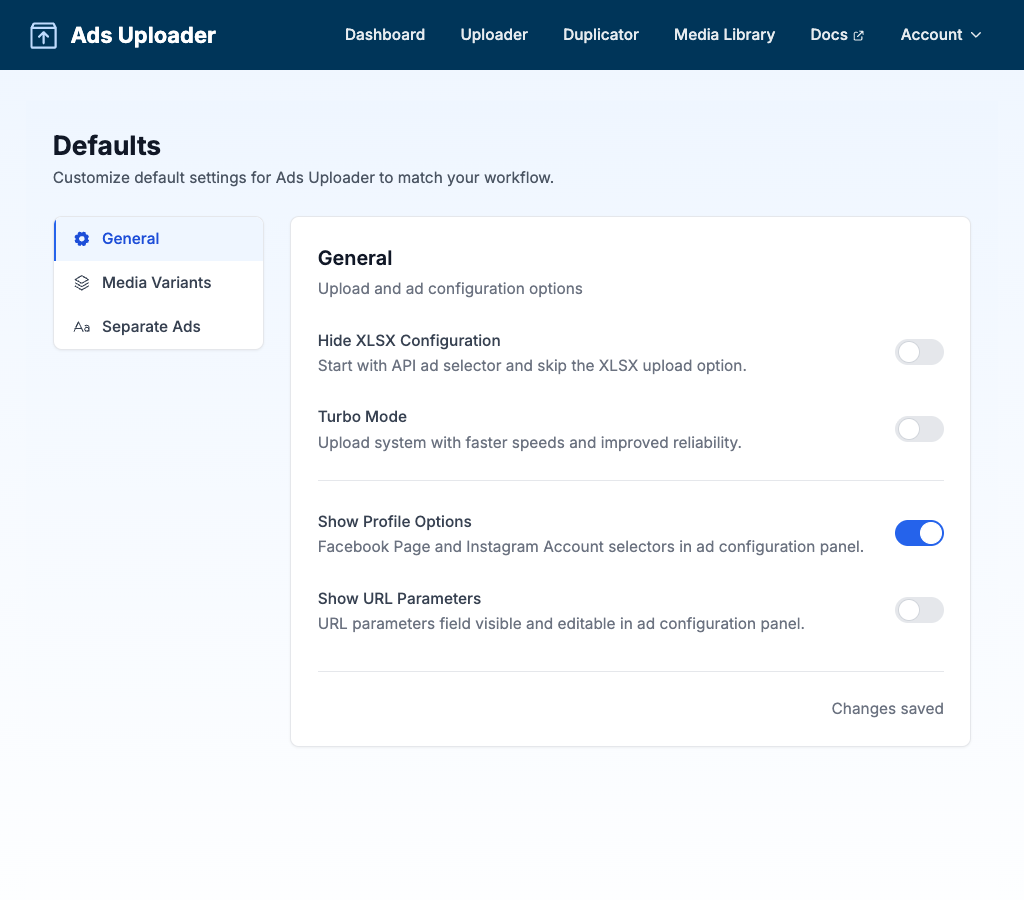
The settings are organized into four tabs: General, Favorite Accounts, Placements, and Separate Ads.
General
Configure upload and ad configuration options.
Hide XLSX Configuration
Start with the existing-ad selector and skip the spreadsheet upload option. When enabled, the XLSX configuration method is hidden from the Uploader panel, simplifying the interface for users who only set up ads from an existing ad.
- On: Only the existing-ad setup is shown
- Off (default): Both the spreadsheet (XLSX) and existing-ad options are available
Turbo Mode
Toggle the faster upload system with improved speeds and reliability.
- On (default): Faster uploads with improved reliability
- Off: Direct uploads to Facebook servers
Show Profile Options
When enabled, Facebook Page and Instagram Account selectors appear in the ad configuration panel. This is useful if you manage multiple pages or Instagram accounts and need to select which profile the ad posts from. A Threads Profile selector also appears whenever your template ad has a Threads profile attached.
- On: Page/Instagram selectors visible in ad configuration
- Off (default): Uses the page/account from your base ad
If your template ad carries a Threads profile, it's inherited by the new ads automatically. When that isn't wanted (or it causes an upload error on the destination account), enable Profile Options and set the Threads Profile dropdown to None before uploading.
Show URL Parameters
Controls whether the URL parameters (UTM tags) field is visible and editable in the ad configuration panel.
- On: URL parameters field visible for editing
- Off (default): URL parameters inherited from base ad
Show Ad Set Targeting
Adds an Edit Ad Set Targeting button to Ad Set Options so you can set country, city, zip or post code, age, gender, and detailed targeting for new ad sets instead of inheriting everything from the source ad set. When a build creates more than one ad set, each ad set can override the shared default individually.
- On: Edit Ad Set Targeting button visible when creating new ad sets
- Off (default): New ad sets inherit the source ad set's full audience
See Ad Set Targeting for the full guide.
Enable Split Destination Testing
Lets you split-test multiple destination URLs by duplicating the ad set for each one, so Meta optimizes every ad and landing page combination independently. When enabled, the option appears in Ad Set Options when creating new ad sets. See Split Destination for the full workflow.
Thumbnail Matching
When you upload videos, files matching videoName_thumbnail.jpg are auto-attached as the video's thumbnail.
| Setting | Default | Description |
|---|---|---|
| Separator | _ | Character between filename and suffix |
| Suffix | thumbnail | Word that identifies thumbnail files |
Examples:
| Separator | Suffix | Video | Thumbnail |
|---|---|---|---|
_ | thumbnail | promo.mp4 | promo_thumbnail.jpg |
- | thumb | promo.mp4 | promo-thumb.jpg |
_ | cover | promo.mp4 | promo_cover.jpg |
Favorite Accounts
Choose which ad accounts appear first in the ad account selector across the app. Star the accounts you use most and they're pinned to the top of every account picker - useful for teams that manage dozens of accounts but only work in a few day-to-day.
Placements
Controls how Ads Uploader detects aspect ratio variants in your filenames and which Meta placement each variant serves at launch.
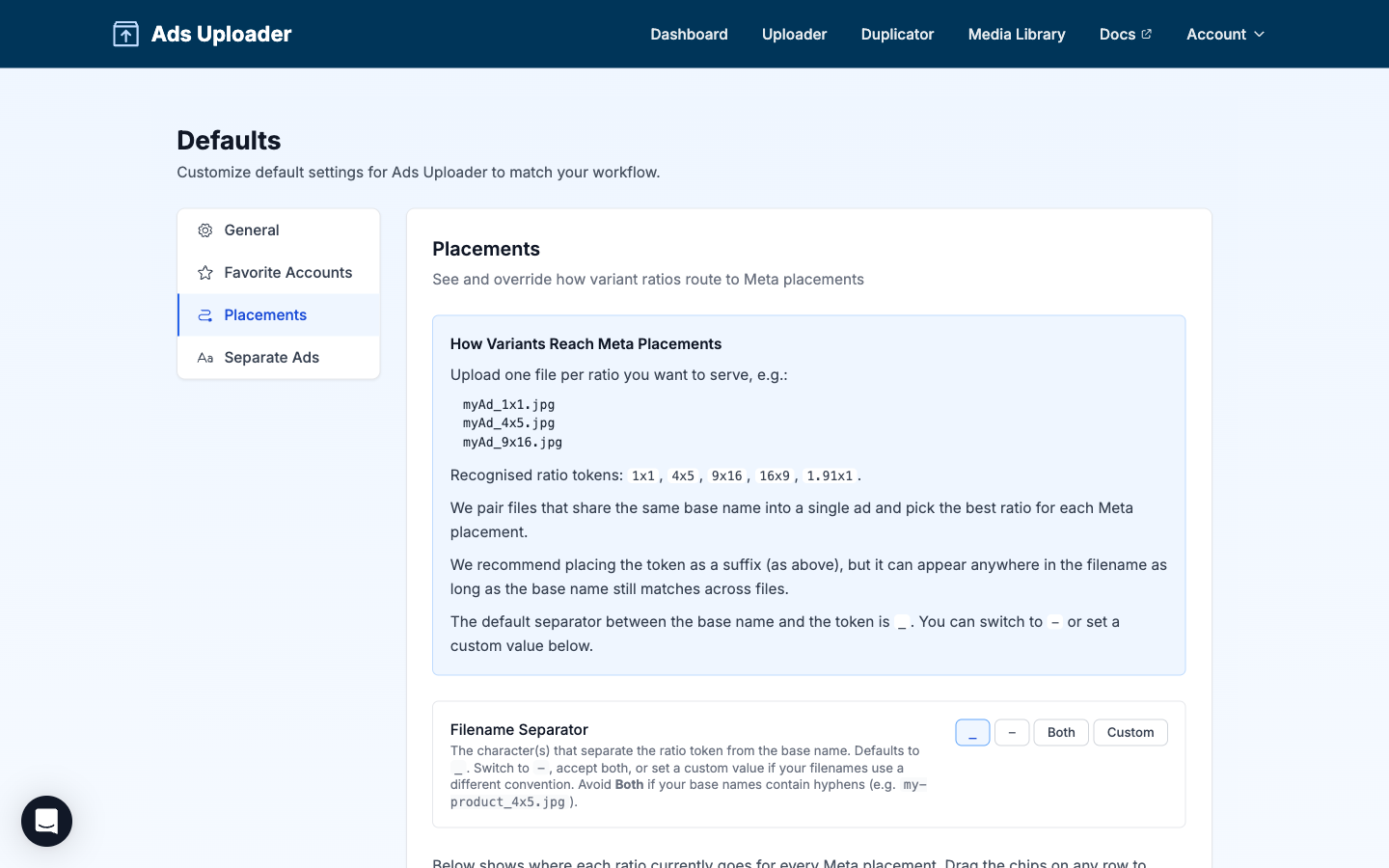
How Variants Reach Meta Placements
Upload one file per ratio you want to serve. Files that share the same base name are paired into a single ad with multiple variants, then each Meta placement receives the variant that best matches its preferred ratio.
Recognised ratio tokens: 1x1, 4x5, 9x16, 16x9, 1.91x1 (also 191x100 and 19x10).
The token can appear at the end of the filename (recommended), in the middle, or at the start - as long as the base name matches across files in the group. The legacy _vertical and _horizontal suffixes still work and map to 9x16 and 16x9.
See Aspect Ratio Variations for the full naming guide.
Filename Separator
The character(s) between the base filename and the ratio token. By default, both an underscore (_) and a dash (-) are accepted.
| Option | Behavior |
|---|---|
Both (default) | Accepts either _ or -. |
_ | creative_4x5.jpg |
- | creative-4x5.jpg |
Custom | Set your own separator (up to 3 characters). |
Routing Matrix
The matrix shows where each ratio currently goes for every Meta placement. Each row lists the placement on the left and a chain of ratio chips on the right, in priority order.
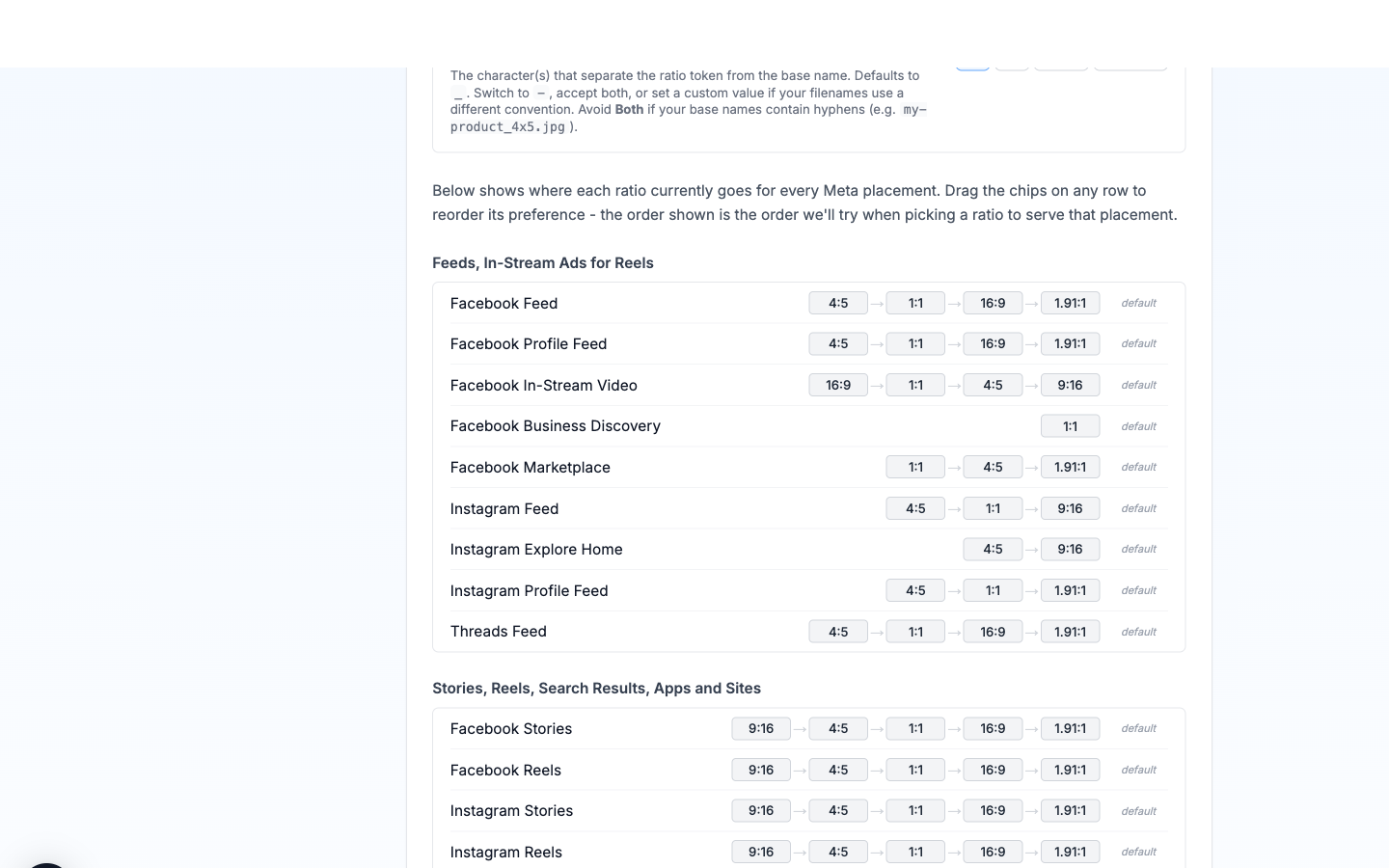
How the chain is read: Ads Uploader walks the chain from left to right and serves the first ratio in the chain that you actually uploaded for that ad. For example, if Facebook Feed's chain is 4:5 → 1:1 → 16:9 → 1.91:1 and you uploaded a 1:1 and a 16:9 for an ad, Facebook Feed gets the 1:1 (the first ratio in the chain that's available). If you uploaded only a 9x16, the chain falls through and Meta's own placement defaults take over.
Reordering: Drag the chips on any row to set your own priority order for that placement. A chip turns blue once it's been moved from the default. The whole row is reset to the Meta default with the per-row reset link, or every row at once with the global reset banner that appears at the top of the section.
Placement groups: Rows are grouped by the same families Meta uses in Ads Manager:
- Feeds, In-Stream Ads for Reels - Facebook Feed, Profile Feed, In-Stream Video, Business Discovery, Marketplace; Instagram Feed, Explore Home, Profile Feed; Threads Feed.
- Stories, Reels, Search Results, Apps and Sites - Facebook Stories, Reels, Search Results; Instagram Stories, Reels, Search Results, Shop; Messenger Stories; Audience Network Native, Banner & Interstitial and Rewarded Video.
- Right Column, Search - Facebook Right Column and Search Results.
Defaults Worth Knowing
A few placement chains have non-obvious defaults you may want to leave alone:
- Threads Feed - chain is
4:5 → 1:1 → 16:9 → 1.91:1. There's no9:16because Threads crops vertical to4:5on render. If only9:16is uploaded, the chain falls through and Meta's fallback handles it. - Instagram Explore Home - chain is
4:5 → 9:16. Meta restricts Explore Home video to ratios between9:16and4:5, so1:1is omitted. - Audience Network Rewarded Video - story-first (
9:16 → ...) because the format is built for vertical full-screen.
Separate Ads
When using the "Separate Ads" text strategy (creating individual ads for each headline/body combination), configure how the ad variations are named.
Settings
| Setting | Default | Description |
|---|---|---|
| Separator | _ | Character(s) between ad name and suffix (max 3) |
| Headline Prefix | H | Prefix for headline variations (max 10) |
| Primary Text Prefix | P | Prefix for primary text variations (max 10) |
Preview
With default settings, ads are named like:
- Headline variation only:
AdName_H1,AdName_H2 - Primary text variation only:
AdName_P1,AdName_P2 - Combined:
AdName_H1_P1,AdName_H1_P2,AdName_H2_P1, etc.
Custom Example
With separator -, headline prefix hl, and primary text prefix pt:
AdName-hl1-pt1,AdName-hl1-pt2,AdName-hl2-pt1, etc.
This naming pattern is used in both Excel/CSV exports and the in-app ad creation flow.