Ad Naming Patterns
By default, each new ad is named after its file. A naming pattern lets you build names in a consistent format instead, so your ads are easy to find and filter in Meta Ads Manager. A pattern mixes plain text with placeholders: short codes in curly brackets, such as {filename} or {index}, that are replaced for each ad.
Turn On a Custom Ad Name
- In the Ad Configuration panel, find Ad Name Options.
- Tick Use custom ad name pattern. The pattern builder opens.
- Type your pattern, or click a placeholder chip to insert it where your cursor is. Hover a chip to see what it does, or click the info icon in the field for help.
- Check the Ad Name column in the preview table.
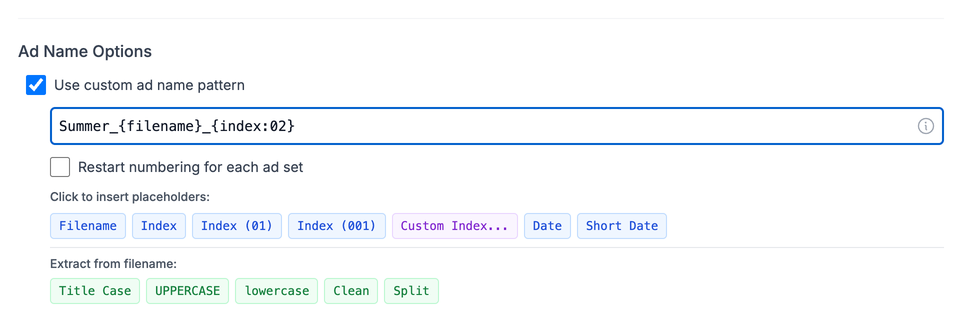
When your pattern contains an {index} placeholder, a Restart numbering for each ad set checkbox appears. Tick it to start counting from the beginning in every ad set, instead of numbering across the whole launch.
The same pattern builder is used for the Ad Set Name Pattern field in Ad Grouping.
Basic Placeholders
| Placeholder | What it gives you | Example |
|---|---|---|
{filename} | File name without the extension | summer_sale_v1.mp4 gives summer_sale_v1 |
{index} | A running number | 1, 2, 3 |
{index:01} | A running number with padding | 01, 02, 03 |
{index:001} | A running number with 3-digit padding | 001, 002, 003 |
{date} | Today's date | 2026-01-13 |
{date:short} | Today's month and day, with no separator | 0113 |
Numbering with a Custom Start
In {index:NN}, the digits set both the start number and the padding:
| Placeholder | Result |
|---|---|
{index:01} | 01, 02, 03 |
{index:50} | 50, 51, 52 |
{index:007} | 007, 008, 009 |
{index:100} | 100, 101, 102 |
To build one without typing, click Custom Index..., set Start from and Padding, then click Insert.
Placeholders for Special Cases
These chips only appear when they apply:
| Placeholder | When it appears | What it gives you |
|---|---|---|
{variation} | Ad set names, with Group variations on | The base name of the variation group |
{destination} | With Split Destination on | The destination label, such as homepage |
{adset} | Ad set names in a custom ad set configuration with Split Destination on | The ad set name you set in the custom configuration window |
You can also type these into an ad name pattern:
| Placeholder | What it gives you |
|---|---|
{campaignName} | The name of the campaign the ad goes into |
{adsetName} | The name of the ad set the ad goes into |
{timestamp} | The current time as a number (milliseconds since 1970), useful for unique names |
{FileName} from older patterns still works and gives the same result as {filename}.
Extract Part of a File Name
Use {split:DELIMITER:POSITION} to take one part of a file name. The delimiter is the character that separates the parts, and the position counts from 1.
For a file named summer_sale_video_banner_9x16.mp4:
| Placeholder | Result |
|---|---|
{split:_:1} | summer |
{split:_:2} | sale |
{split:_:3} | video |
{split:_:4} | banner |
The delimiter can be longer than one character. For example, {split: - :1} splits Brand v1 - Emotional on space, hyphen, space and returns Brand v1.
Change the Text
These placeholders change the case of a file name or of another placeholder, or tidy it up:
| Placeholder | What it does | Example |
|---|---|---|
{titlecase:} | Capitalises the first letter of each word | hello world gives Hello World |
{uppercase:} | Converts to UPPERCASE | hello gives HELLO |
{lowercase:} | Converts to lowercase | HELLO gives hello |
{clean:} | Removes a ratio suffix at the end (_9x16, -1x1, _4x5, _16x9, _1.91x1, _vertical, _horizontal) | Hook A_9x16 gives Hook A |
Left empty, these work on the whole file name. For example, {uppercase:} turns summer_sale into SUMMER_SALE.
Title case treats only spaces as word breaks, so hello_world becomes Hello_world.
When to use {clean:}: when several ratio versions of the same creative are uploaded together, they become one ad and the ratio suffix is removed for you. A single file keeps its full name, though. Use {clean:{filename}} to remove the suffix in every case.
Combine Placeholders
Put {split:} inside a text placeholder to extract a part and change it in one go:
{titlecase:{split:_:3}}
For brand_campaign_lifestyle_product.mp4, {split:_:3} gives lifestyle, and {titlecase:{split:_:3}} gives Lifestyle.
Examples
Structured Names
- File:
brand_campaign_lifestyle_product_9x16.mp4 - Pattern:
Ad|Style: {titlecase:{split:_:3}}|Type: {titlecase:{split:_:4}} - Result:
Ad|Style: Lifestyle|Type: Product
Numbered Names
- Files:
summer_sale.mp4,winter_promo.mp4 - Pattern:
Ad {index:01}_{filename} - Result:
Ad 01_summer_sale,Ad 02_winter_promo
Dated Names
- File:
summer_sale.mp4 - Pattern:
{date:short}_{uppercase:} - Result on 13 January:
0113_SUMMER_SALE
Tips
- Positions start at 1. The first part is
1, not0. - Missing parts are empty. If you ask for
{split:_:10}and the name has only 3 parts, you get nothing. - Dates in other places. In campaign names and Split Destination labels,
{date:short}givesMM-DDwith a hyphen (01-13). - Separate Ads suffixes. With Separate Ads text, suffixes such as
_H1_P1are added after your pattern. You can change them in User Defaults.